


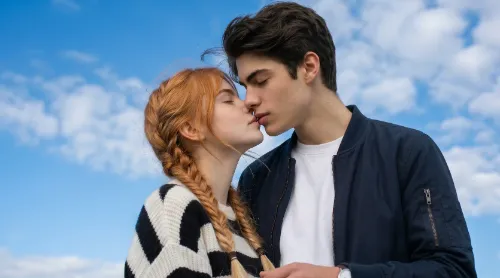

Want to make an AI kissing video from a photo for free? With an AI kissing video generator, you can upload a couple photo, choose an AI kiss effect, and turn a still image into a short romantic video online.
Instead of learning complicated video editing, you only need one clear photo and a simple prompt. The AI will animate the people in the image, create natural movement, and generate a romantic kissing video that you can download or share.
AI kissing videos have become popular because they are simple, emotional, and easy to post on TikTok, Instagram Reels, YouTube Shorts, or send as a private message. Like AI hug videos and other photo-to-video effects, they turn ordinary pictures into short, shareable moments.
In this guide, you’ll learn how to make an AI kissing video from a photo for free, what kind of photo works best, which prompts to use, and how to make the final result look more natural.
What Is an AI Kissing Video from a Photo?
An AI kissing video from a photo is a short video created by artificial intelligence using a still image.
You upload a photo, and the AI turns it into a moving video where two people appear to move closer and share a romantic kiss. The result usually looks like a short couple video, even though it started from a single image.
People use AI kissing videos for many reasons, such as:
- Couple memories
- Romantic messages
- Anniversary videos
- Valentine’s Day edits
- Wedding-style clips
- Anime couple videos
- Social media posts
- Fun private surprises
The biggest advantage is that you do not need to record a real video. You can use an existing photo and let AI create the motion for you.
How to Make an AI Kissing Video from a Photo for Free
Creating an AI kissing video from a photo for free is simple. Most tools follow the same basic process: upload a photo, choose an effect, add a prompt, generate the video, and download the result.
Use a Preset AI Kiss Effect — No Prompt Needed
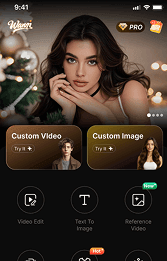
Go to the Wann AI official website, open the Explore section and select the AI kiss effect. This ready-made effect helps you create a romantic kissing video faster, without needing to build the prompt manually.
After uploading your photo, select the AI kiss effect.
Some tools offer ready-made templates, such as:
- AI Kiss
- AI Couple Kiss
- Romantic Kiss
- Anime Kiss
- Wedding Kiss
- Kiss Cam Style
For beginners, using a preset effect is usually easier than writing a long prompt from scratch. The template tells the AI what kind of motion to create.
If your tool allows both effects and prompts, use the AI kiss effect first, then add a short prompt to control the style, mood, and camera movement.
Here is the step-by-step process.
Step 1: Choose a Clear Couple Photo
The first step is choosing the right image.
For the best AI kissing video result, use a photo where the two people are clearly visible and positioned close to each other. If the two people are too far apart, the AI may need to create too much movement. This can make the final video look unnatural. A close-up couple photo usually works better than a full-body photo from far away. The AI can better understand facial details, head position, and romantic movement.
Step 2: Upload Your Photo to a Free AI Kissing Video Generator
Go to the Wann AI official website and upload your photo directly in the creation box on the homepage. This is the simplest way to make an AI kissing video from a photo online.
Step 4: Add an AI Kissing Video Prompt
A prompt helps the AI understand exactly what you want.
For an AI kissing video, your prompt should describe the action, mood, lighting, and movement.
A simple prompt can be:
Make the couple in the photo gently move closer and share a romantic kiss, with natural facial expressions, soft lighting, and smooth realistic motion.
This is better than only writing “make them kiss” because it gives the AI more direction.
Step 5: Generate and Preview the AI Kissing Video
Once your photo and prompt are ready, click generate.
The AI will process the image and create a short AI kissing video. After generation, preview the result carefully.
Check these details:
- Do the faces look natural?
- Is the kissing motion smooth?
- Are the expressions realistic?
- Is the background stable?
- Are there any strange distortions?
- Does the video feel romantic and believable?
If the result is not perfect, try again with a clearer photo or a slightly different prompt.
For example, if the motion looks too strong, add words like:
gentle movement, subtle motion, natural expressionIf the video looks too plain, add:
cinematic lighting, warm atmosphere, slow camera zoomSmall prompt changes can make a big difference.
Step 6: Download and Share Your AI Kiss Video
When you are happy with the result, download the video.
You can use your AI kiss video for:
- TikTok
- Instagram Reels
- YouTube Shorts
- Messenger
- Couple messages
- Anniversary posts
- Romantic slideshows
For social media, a vertical 9:16 video usually works best. If your tool supports aspect ratio options, choose vertical format for TikTok, Reels, and Shorts.
You can also add music, captions, or a before-and-after effect to make the video more engaging.
Best Prompts for AI Kissing Videos
Here are some ready-to-use prompts for creating an AI kissing video from a photo.
Realistic AI Kiss Prompt
Make the couple in the photo gently move closer and share a romantic kiss, with natural expressions, soft lighting, and smooth realistic motion.
Cinematic AI Kissing Video Prompt
Turn this couple photo into a cinematic kissing video, warm sunset lighting, emotional atmosphere, slow camera zoom, and realistic movement.
Cute Romantic Kiss Prompt
Create a cute romantic kiss video from this photo, soft background, gentle smiles, sweet emotional moment, and smooth natural animation.
Wedding Kiss Prompt
Make the couple share a beautiful wedding-style kiss, elegant lighting, romantic atmosphere, slow motion, and cinematic camera movement.
Anime Kiss Prompt
Create an anime-style kissing video from this image, soft romantic lighting, beautiful background, cute expressions, and smooth animation.
Kiss Cam Style Prompt
Turn this photo into a fun kiss cam style video, playful romantic mood, smooth zoom-in, natural reaction, and social media ready.
Tips to Make Your AI Kissing Video Look More Natural
If you want your AI kissing video to look more realistic, focus on the photo and prompt.
Use a photo where both people are close
The AI performs better when the two people are already near each other. If they are far apart, the movement may look forced.
Make sure both faces are visible
Photos with hidden faces, sunglasses, masks, or heavy shadows can make the result less accurate.
Use simple prompts
Do not ask the AI to do too many things at once. Focus on one action: a gentle romantic kiss.
Add mood words
Words like soft, gentle, romantic, natural, and cinematic can help the AI create a better result.
Try more than one generation
AI video results can vary. If the first version is not perfect, try another generation with a slightly adjusted prompt.
FAQ
Can I make an AI kissing video from one photo?
Yes. You can make an AI kissing video from one photo using an AI image-to-video tool. Upload a clear image, choose the AI kiss effect, and generate the video online.
What is the best photo for an AI kissing video?
The best photo is a clear couple photo where both faces are visible and the two people are close to each other. Good lighting and a simple background can also improve the result.
Can I make an AI kissing video for free?
Yes. Many tools offer free credits, free trials, or limited free generations. You can start by uploading a photo and creating a short AI kissing video for free.
What is the best free AI kissing video generator?
The best free AI kissing video generator should be easy to use, support photo upload, create natural kissing motion, and allow users to preview the video without complicated editing.
Can I create an anime kissing video with AI?
Yes. You can create an anime AI kissing video by uploading an anime-style image and using an anime kiss prompt. This works well for fictional characters and creative edits.
Can I use AI kissing videos on TikTok or Instagram?
Yes. You can share AI kissing videos on TikTok, Instagram Reels, YouTube Shorts, and other platforms, as long as the content follows platform rules and respects privacy and consent.
Do I need video editing skills?
No. You do not need editing skills. With an AI kissing video generator, you only need to upload a photo, choose an effect, add a prompt, and generate the video.
Final Thoughts
Making an AI kissing video from a photo for free is now simple. You do not need cameras, editing software, or animation skills. With the right photo and prompt, you can turn a still image into a short romantic video online.
For the best result, use a clear couple photo, choose an AI kiss effect, write a simple romantic prompt, and preview the video before downloading.
Try Wann Ai today and start creating an AI kissing video from a photo for free online.


'%20fill-opacity='.4'/%3e%3cpath%20d='M29.07%2012c.982%200%201.473%200%201.88.194.35.166.667.457.863.79.23.389.27.859.354%201.797.27%203.072.518%207.922-.297%2010.472-1.03%203.22-5.8%206.507-8.257%208.023-.477.295-.715.441-1.038.515a2.227%202.227%200%200%201-.868.006c-.324-.07-.565-.215-1.046-.504-2.512-1.51-7.435-4.811-8.478-8.04-.888-2.752-.622-7.52-.327-10.524.09-.914.135-1.372.365-1.757.196-.327.516-.617.86-.78.407-.193.89-.192%201.853-.192H29.07z'%20fill='var(--fill-0,%20%23FD7F11)'/%3e%3cpath%20d='M26.337%2017.75a.854.854%200%200%201%201.212-.11.872.872%200%200%201%20.11%201.218l-6.088%207.392a.855.855%200%200%201-1.2.122l-.07-.063-3.906-3.944a.871.871%200%200%201%200-1.222.853.853%200%200%201%201.216%200l3.24%203.268%205.486-6.66z'%20fill='var(--fill-0,%20white)'/%3e%3c/svg%3e)