


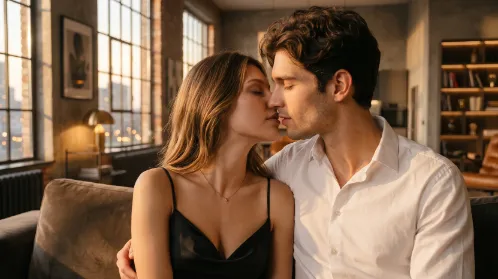

If your AI kiss video looks fake, don’t keep regenerating with the same prompt. Most of the time, you only need to adjust one thing: motion, face stability, mouth alignment, or background movement.
Use this prompt first:
Create a realistic AI kiss video where the couple slowly leans closer and shares a gentle kiss. Keep both faces natural, preserve their identity, use subtle head movement, soft expressions, realistic timing, and a stable camera.
This prompt works better than a simple “make them kiss” prompt because it tells the AI to keep the movement small and natural.
If the Kiss Looks Too Fast
Add this to your prompt:
slow lean-in, gentle kiss, natural pacing
Better version:
Let the couple slowly lean closer and share a gentle kiss with natural pacing and subtle head movement.
Do not use words like intense, dramatic, or passionate if you want a realistic result. These words often make the motion too strong.
If the Faces Change or Look Distorted
Add this:
preserve identity, minimal facial change, natural expressions
Better version:
Preserve both faces and keep facial changes minimal while creating a soft romantic kiss.
If the faces are still changing too much, use a less close-up result. Close-up kiss videos make face problems more obvious.
If the Mouths Don’t Align
Add this:
natural face alignment, slight head turn, gentle lean toward each other
Better version:
Keep the faces naturally aligned as the couple gently leans toward each other for a soft kiss.
This is useful when the heads move awkwardly or the kiss does not connect naturally.
If the Background Warps
Add this:
stable background, locked camera, minimal camera movement
Better version:
Keep the background stable and the camera locked while only the couple moves gently.
Avoid asking for strong zoom, moving camera, or dramatic background changes until the base video already looks stable.
If the Video Looks Too Staged
Use more casual wording.
Try:
Create a natural couple moment where they smile softly, lean in slowly, and share a gentle kiss.
This often looks better than asking for a “cinematic romantic kiss,” because the AI focuses on a small real moment instead of overacting the scene.
The Fastest Fix
If you only want one simple prompt, use this:
Make the couple gently lean closer and share a soft kiss. Preserve both faces, keep expressions natural, use subtle movement, realistic timing, and a stable background.
This is the safest version for most photos.
When You Should Change the Photo
If the result still looks bad after 2-3 tries, stop changing the prompt and use another photo.
Change the photo if:
The faces are too small.
One face is partly hidden.
The people are too far apart.
The image is blurry or heavily filtered.
The angle makes the kiss impossible to animate naturally.
A better photo will usually improve the result more than a longer prompt.
How to Use This on Wann AI
On Wann AI, start with the preset AI kiss effect in Explore. Generate once first.
If the result looks fake, don’t rewrite everything. Add only the fix you need:
For fast motion: slow lean-in, natural pacing
For changing faces: preserve identity, minimal facial change
For mouth mismatch: natural face alignment, slight head turn
For background warping: stable background, locked camera
Small changes usually work better than long prompts.
Final Tip
To make an AI kiss video look more realistic, don’t add more effects. Make the movement smaller.
The best realism words are:
gentle kiss, subtle movement, natural expressions, preserve identity, realistic timing, stable background


'%20fill-opacity='.4'/%3e%3cpath%20d='M29.07%2012c.982%200%201.473%200%201.88.194.35.166.667.457.863.79.23.389.27.859.354%201.797.27%203.072.518%207.922-.297%2010.472-1.03%203.22-5.8%206.507-8.257%208.023-.477.295-.715.441-1.038.515a2.227%202.227%200%200%201-.868.006c-.324-.07-.565-.215-1.046-.504-2.512-1.51-7.435-4.811-8.478-8.04-.888-2.752-.622-7.52-.327-10.524.09-.914.135-1.372.365-1.757.196-.327.516-.617.86-.78.407-.193.89-.192%201.853-.192H29.07z'%20fill='var(--fill-0,%20%23FD7F11)'/%3e%3cpath%20d='M26.337%2017.75a.854.854%200%200%201%201.212-.11.872.872%200%200%201%20.11%201.218l-6.088%207.392a.855.855%200%200%201-1.2.122l-.07-.063-3.906-3.944a.871.871%200%200%201%200-1.222.853.853%200%200%201%201.216%200l3.24%203.268%205.486-6.66z'%20fill='var(--fill-0,%20white)'/%3e%3c/svg%3e)