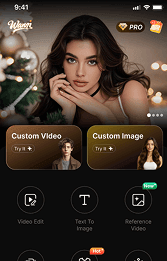




Hey guys, do you feel me?! AI videos are totally blowing up on every platform right now. You scroll around and see "Hollywood-level blockbusters" or "3D animated short films" everywhere. Then you look at yourself, furiously typing at the screen, only to come up with: "Draw something pretty for me."
Don't panic! Today, we’re here to save the day for beginners and anyone struggling with prompts. We’re going to dive into a hidden gem AI tool that is basically the "point-and-shoot camera of video creation"—Wann.
A lot of you have been sliding into my DMs asking: "Can Wann generate videos directly from text?"
Listen up! The ultimate combo in Wann that guarantees zero bad shots and lets you direct like a pro is actually: Text-to-Image ➡️ Image-to-Video.
Alright, future directors, take your seats. The magic is about to begin! 🪄
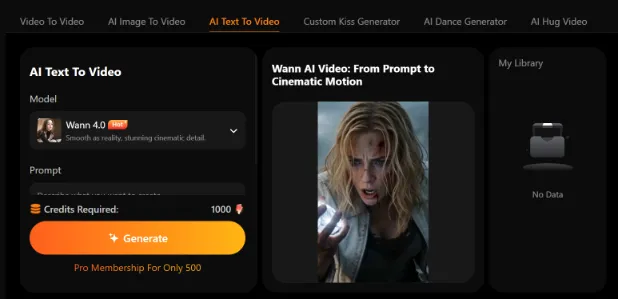
🛠️Laying the Foundation (Crafting the perfect opening with "Text-to-Image")
As the saying goes, a great video is all about that stunning first impression. For 3D animation, texture is everything!
1. Pick your script (Choose a style): Open Wann and head straight to "Text-to-Image." Today’s vibe is cozy and healing, so let's pick the "3D/Pixar Animation Style."
2. Chant the right spell (Write prompts): This is the soul of the process! Never just say "a little cat" to the AI, or it will break down internally. We need to use magic to defeat magic!
❌ Newbie Spell: A cat cooking soup. (AI: That's it? Here is a random stray cat.)
✅ Pro Spell:
Pixar 3D animation style, cinematic top lighting! A fluffy, chubby orange cat wizard, wearing an oversized starry magic hat, brewing a glowing purple potion in a mysterious treehouse. Fireflies flying in the background, floating magic books, 8k resolution, ultra-detailed fur—make it as cute as possible!
3. Action! (Lock in the look): Hit generate, pick the image that makes you go "Awww, that’s so cute!" and save it. Congrats, the very first frame of your animated blockbuster is done!
🚀Bringing It to Life (Witnessing the magic of "Image-to-Video")
Now that we have our masterpiece, it's time to breathe life into it.
- Get your actors on stage: Go back to the homepage, click on "AI Image-to-Video" (or Motion Generation), and drop in the "orange cat masterpiece" you just created.
- Director yells Action: The AI automatically figures out who the main character is (the cat) and what the background is (the potion and treehouse). If you're feeling ambitious, you can play around with setting the "first and last frames." For example, the cat staring blankly at the start, and the potion bubbling up with heart shapes at the end. The AI will smoothly fill in the animation in between. It’s mind-blowing!
- Witness the magic: In the time it takes to take a sip of water, you'll see... the picture is moving! The fluffy ears of the orange cat twitch, the purple potion starts bubbling, and fireflies dance across the screen. In that moment, you are literally a runaway Disney director!
✂️Post-Production & It's a Wrap!
Got the video, but it’s only a few seconds long and leaves you wanting more? Wann's post-production team has you covered:
- "Director, add more scenes!" (Video Extension): Click "Extend Video," and the AI will continue the vibe smoothly. Watch the cat brew potions for as long as you want.
- Built-in Editing Room: Hate switching apps? Wann lets you edit and adjust ratios right inside. It’s a one-stop shop—finish it and post it straight to Instagram or TikTok to flex!
💡 Director's Secret Tips (Don't tell anyone)
- Copying homework is fine (and very useful): No inspiration? Don't know how to write 3D prompts? Just browse the Trending Templates on Wann’s homepage! Find a masterpiece you like, click "Use same style," tweak a few words (e.g., change the orange cat to a corgi, the potion to BBQ), and boom—it’s your original blockbuster!
- Style Swap, keep the face: Making a TV series? Use the "Style Swap" feature to lock in the orange cat's face, then throw it into a spaceship, a deep-sea submarine, or a magic school. The character stays perfectly consistent!
- Be precise with your spells: AI takes things literally. Keep your prompts clean and focused. Don't ask for "cute and healing" while also asking for "terrifying and creepy." You'll just confuse it.
🎬That's a Wrap!
From typing the first line of text to watching a stunning 3D animation play on your phone, Wann really lowers the barrier of AI creation to ground zero. Whether you want to make viral pet shorts or just turn your fairytale dreams into reality, it’s got you covered.
Don't just sit there! Your director's chair is ready. Go download Wann and give it a try! Remember to drop your first masterpiece in the comments—let’s see who the real "Pixar Director" is! 🌟🐾




'%20fill-opacity='.4'/%3e%3cpath%20d='M29.07%2012c.982%200%201.473%200%201.88.194.35.166.667.457.863.79.23.389.27.859.354%201.797.27%203.072.518%207.922-.297%2010.472-1.03%203.22-5.8%206.507-8.257%208.023-.477.295-.715.441-1.038.515a2.227%202.227%200%200%201-.868.006c-.324-.07-.565-.215-1.046-.504-2.512-1.51-7.435-4.811-8.478-8.04-.888-2.752-.622-7.52-.327-10.524.09-.914.135-1.372.365-1.757.196-.327.516-.617.86-.78.407-.193.89-.192%201.853-.192H29.07z'%20fill='var(--fill-0,%20%23FD7F11)'/%3e%3cpath%20d='M26.337%2017.75a.854.854%200%200%201%201.212-.11.872.872%200%200%201%20.11%201.218l-6.088%207.392a.855.855%200%200%201-1.2.122l-.07-.063-3.906-3.944a.871.871%200%200%201%200-1.222.853.853%200%200%201%201.216%200l3.24%203.268%205.486-6.66z'%20fill='var(--fill-0,%20white)'/%3e%3c/svg%3e)