



Let’s be honest: we’ve reached a point where the "perfect" AI image is the easiest thing to spot—and the quickest thing to scroll past.
In 2026, the digital landscape has shifted. Whether you're building a personal brand on Instagram or curating a mood-board style TikTok feed, audiences are exhausted by the "too polished" look. The era of plastic, hyper-perfect AI art is fading. The new aesthetic is "Imperfect by Design"—visuals that feel raw, human, and effortlessly candid.
If you’re struggling to create high-quality content without a studio setup, you don’t need more gear. You need a better Prompt Engineering strategy.
Today, I’m sharing three of my go-to prompt sequences that I use on Wann.ai to generate consistent, aesthetic, and—most importantly—authentic-looking assets.
The Secret Sauce: "Anti-AI" Prompting
If you want to move away from the "AI-slop" look, you need to add specific "imperfection" markers to your prompts. Stop using generic tags like masterpiece or ultra-detailed. Instead, frame your requests like a photographer.
Use these keys in your prompts:
- Device Context: Specify a camera or phone type (e.g., shot on iPhone 16 Pro).
- Motion/Candid: Add keywords like motion blur, candid POV, or unposed.
- Physical Texture: Emphasize tactile elements like 35mm film grain, dust particles, or natural sunlight.
The "High-Aesthetic" Prompt Library
Here are three templates you can plug directly into Wann.ai to build a cohesive visual identity.
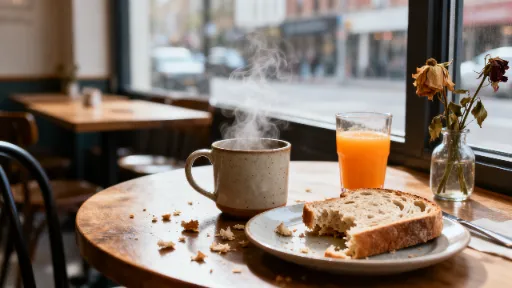
1. The "Candid Lifestyle" Look (Perfect for IG Stories/Posts)
This is all about the "I just took this with my phone" vibe, but with perfect cinematic lighting.
Candid POV photo taken on iPhone 16 Pro, a messy but aesthetic breakfast table with a half-eaten sourdough toast, blurred background of a quiet city cafe, morning window light, subtle motion blur, authentic texture, zero-post-processing, hyper-realistic, 8k resolution, cinematic atmosphere.
2.The "Serene Space" Vibe (Perfect for Home & Lifestyle Content)
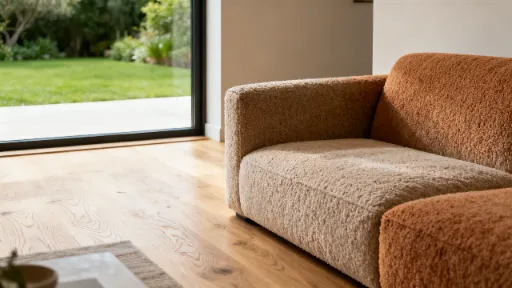
This sequence establishes a tranquil and high-end atmosphere, focusing on clean textures and light. It creates the "I wish I lived here" feeling that resonates with design-focused audiences.
Interior design shot of a serene, minimalist living room. Natural light floods the space, highlighting the textures of light oak wood flooring and boucle fabric sofa. A large, uncluttered window overlooks a quiet, green garden. No harsh artificial lights. Calming and peaceful atmosphere, architectural digest style, hyper-realistic, 8k, cinematic composition.
3. The "Tactile Detail" Look (Perfect for Carousel/Mood Boards)
High-end brands use close-ups to tell a story about quality. Use this to break up your feed with something organic.
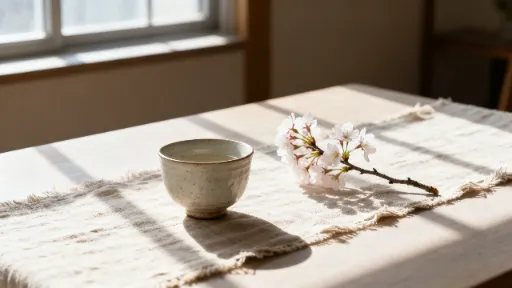
Close-up macro shot of textured linen fabric and a single delicate flower, soft diffused natural side-lighting, minimal composition, deep shadows, shallow depth of field, tactile aesthetic, raw and organic, photorealistic, 8k, professional photography style.

Why This Workflow Wins
Consistency is the hardest part of building a brand. By using these prompt "formulas," you aren't just generating random images; you’re building a visual language.
When you consistently use the same lighting tags (like soft diffused natural side-lighting) and texture markers (35mm film grain), your feed starts to feel cohesive and intentional, even if you’re using AI to generate every piece of content.
Ready to level up?
Stop scrolling past generic stock photos. Take these prompts to Wann.ai and start building your own consistent brand library.
Pro-tip: Don't just generate once. Use the iterations to refine the mood—tweak the lighting from morning window light to golden hour glow to see how it shifts the emotional tone of your feed.



'%20fill-opacity='.4'/%3e%3cpath%20d='M29.07%2012c.982%200%201.473%200%201.88.194.35.166.667.457.863.79.23.389.27.859.354%201.797.27%203.072.518%207.922-.297%2010.472-1.03%203.22-5.8%206.507-8.257%208.023-.477.295-.715.441-1.038.515a2.227%202.227%200%200%201-.868.006c-.324-.07-.565-.215-1.046-.504-2.512-1.51-7.435-4.811-8.478-8.04-.888-2.752-.622-7.52-.327-10.524.09-.914.135-1.372.365-1.757.196-.327.516-.617.86-.78.407-.193.89-.192%201.853-.192H29.07z'%20fill='var(--fill-0,%20%23FD7F11)'/%3e%3cpath%20d='M26.337%2017.75a.854.854%200%200%201%201.212-.11.872.872%200%200%201%20.11%201.218l-6.088%207.392a.855.855%200%200%201-1.2.122l-.07-.063-3.906-3.944a.871.871%200%200%201%200-1.222.853.853%200%200%201%201.216%200l3.24%203.268%205.486-6.66z'%20fill='var(--fill-0,%20white)'/%3e%3c/svg%3e)